Planning Team Changes Directly in the Matrix
Matrix edit mode lets you model team placements visually, preview the resulting totals, and apply a reviewed set of changes together.
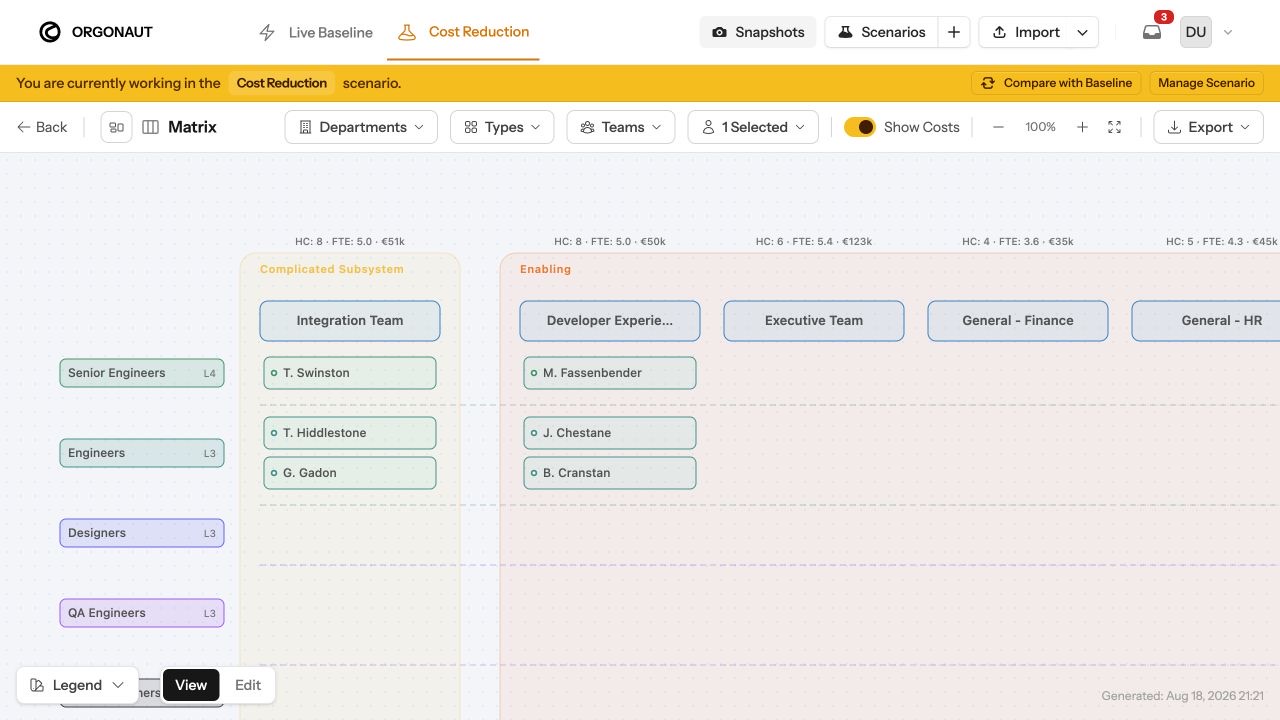
Some staffing questions are easier to understand when teams sit next to each other.
The Matrix in Orgonaut places role types on one axis and teams on the other. Contributors appear where those two parts of the organisation meet, with team headcount, FTE, and cost available in the same view.
Stage the move where you can see it
In an editable scenario, you can switch the Matrix into Edit mode and drag a contributor from one team to another. You can also add a secondary placement, adjust allocation, or move someone into the unassigned area when that reflects the plan.
The change tray records each staged command. The Matrix previews the proposed canvas state before anything is applied, and team cards recalculate their projected headcount, FTE, and cost.
For a simple move, that means you can see both sides at once. The receiving team gains capacity, the source team loses it, and the proposed structure remains clearly marked as a preview.
Review the set together
Staging is useful when a planning decision has several related parts. A team move might also require a new allocation percentage or a change to the contributor’s primary placement.
Keeping those commands in one tray gives the planner a chance to review the complete set, clear it, or apply it together. It also encourages smaller, coherent batches that are easier for another person to check.
The same scenario can then be reviewed through Charts and the scenario delta summary. That makes it possible to move from a visual edit to a wider cost and capacity review without reconstructing the plan elsewhere.
A practical planning surface
The Matrix is especially useful when a spreadsheet begins to hide the shape of the organisation. Role rows expose gaps and concentrations, while team columns show the operating structure those roles support.
It turns a familiar planning table into a live part of the organisational model. For us, the valuable part is the combination of visual speed and an explicit apply boundary.
The Matrix edit mode guide covers the available moves and the checks worth running after each batch.